What does the program do? You can say from the name - it will upload videos to YouTube for you. Run the program and enter your user name and password, and it logs you into YouTube. Then select your video, and write a title and description, and add tags, and walk through the simple steps of uploading your video, including selecting a category.
It does more than just automate the process of uploading your videos, though. YouTube has a limit of 10 minutes or 100 MB per video, so the program includes a simple, easy-to-use video trimmer that lets you trim the video to size before uploading it.
It only works with Windows XP. Download free from here.
Showing posts with label software. Show all posts
Showing posts with label software. Show all posts
14 June 2007


13 June 2007
New Apple Leopard Features - 13

Time Machine
We've known about Time Machine, the automatic backup feature built into Leopard, for a while now. Connect an external drive, and Time Machine will offer to begin automatically backing up your files.
If something goes wrong and you'd like to retrieve a previous version of a file, simply fire up Time Machine and use its timeline interface to zip back to the last time you edited the file.
Apple has said that Leopard has over 900 new features, but I don't want to list them all here. The 13 new features I highlighted should give us a good indication of what's coming.
New Apple Leopard Features - 12

Stationery
Support for stationery lets you jazz up your e-mail with HTML-based templates.
New Apple Leopard Features - 11

Mail RSS
Apple has also built in the obligatory RSS reader, but searching and Smart Mailboxes make finding things within your feeds easier.
New Apple Leopard Features - 10

Mail Notes
The latest update to Mail supports handy little notes that get synced to your mail server, so your reminders can follow you everywhere.
New Apple Leopard Features - 9

Front Row
Leopard's updated Front Row interface looks much more like Apple TV.
New Apple Leopard Features - 8

iChat Theater
Collaborate with other users or just have fun sharing files in iChat Theater. You can share any file that works with Quick Look while chatting.
New Apple Leopard Features - 7

iChat Backdrops
New backdrops and photo effects let you spice up your iChats. Add in the appropriate backdrop, and you can make it look like you're chatting from Paris.
New Apple Leopard Features - 6

Spaces
Virtual-desktop fans will want to check out Spaces, which lets you build multiple desktops for different projects or activities.
New Apple Leopard Features - 5

Reflective Dock
It may not be the most useful feature, but the reflective dock in Leopard sure looks nice. Drag an application window down toward the bottom of your screen, and you'll see its reflection in the dock background.
New Apple Leopard Features - 4

Quick Look
View files without opening them, using Quick Look. Apple promises that this file viewer will work with nearly any format on your system, including videos and multipage documents.
New Apple Leopard Features - 3

Preview Icons
Even the normal icon view for files should look a bit more detailed. The same attractive thumbnails that drive Cover Flow appear here as well.
New Apple Leopard Features - 2

Cover Flow Is in Finder
Leopard's reworked Finder now permits you to flip though your documents and images using the same Cover Flow interface that iTunes employs to let you browse thorugh album covers. You can flip through multipage documents or play videos right in Cover Flow.
New Apple Leopard Features - 1

I'm not a real a big Mac fan myself, but I do like it. Apple showed off lots of new features of its upcoming Leopard release of Mac OS X this week. Here's a look at some of the highlights.
Stacks
Leopard's new system for eliminating desktop clutter is called "Stacks." Click any stack you've created, and the images, folders, applications, and other files you've added to it fan out from its icon in the dock.
If a stack contains many items, it appears in the grid view. Files downloaded in Safari or Mail automatically appear in a downloads stack.
12 June 2007
Safari is on Windows now!

Apple has released the new Safari 3 Public Beta which can work on Windows XP or Vista. It's the first time that Safari works with Windows. Is this related to the meeting between Bill and Jobs :-)?
According to Apple, there are 12 reasons you'll love Safari:
- Blazing performance (Apple said Safari is twice as fast as IE7, don't know whether its' true or not, at least I didn't feel it)
- Elegant user interface (It does look good. Apple is good at it, isn't it?)
- Easy bookmarks (not that special, I think)
- Pop-up blocking (everyone does this)
- Inline find (very handy feature, even better than Firefox, much much better than IE7)
- Tabbed Browsing (both Firefox and IE7 do it)
- SnapBack (could be useful)
- Forms AutoFill (others do as well)
- Built-in RSS (others do as well)
- Resizable text fields (could be handy)
- Private browsing (I won't care this too much, but some people do)
- Security (hard to say)
- Feels like working in an iTunes (I'm not a Mac person at all)
- It works fine on my office computer which runs Windows XP
- Not very well on my home computer which runs Windows Vista Ultimate 64-bit, every time I maximum the window, it disappears.
- Overall, nice try. But I won't use it as my main browser, still prefer Firefox 2 70% of the time, and IE7 for the rest 30%
07 June 2007
Turn on Remote Desktop in Windows Vista
With Remote Desktop, you can connect to your work computer from home and access all of your programs, files, and network resources as though you were actually sitting in front of your computer at work.
Remote Desktop is disabled by default in Windows Vista, but it's easy enough to turn it back on. If you need to access your Vista PC from another location, it's an essential thing to turn on.
Note: The Remote Desktop Connection only feature in Windows Vista Business, Ultimate, and Enterprise editions.
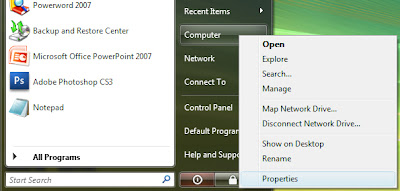
First, go to the configuration page. You can either right-click the Computer icon and choose properties, or you can type in "system" into the start menu search box.
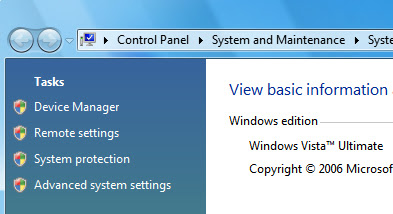
Now you'll want to click the Remote Settings link on the left hand side:
Now you can finally turn it on:
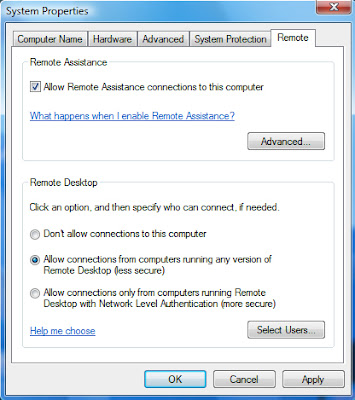
To connect from another Vista PC on the same network, click the "Allow connections only from computers running Remote Desktop with Network Level Authentication" radio button. If you need to connect from a Windows XP or Windows 2000 machine, click the "Allow connections from computers running any version of Remote Desktop" radio button.
Vista will set up firewall rules for you automatically.
Remote Desktop is disabled by default in Windows Vista, but it's easy enough to turn it back on. If you need to access your Vista PC from another location, it's an essential thing to turn on.
Note: The Remote Desktop Connection only feature in Windows Vista Business, Ultimate, and Enterprise editions.
First, go to the configuration page. You can either right-click the Computer icon and choose properties, or you can type in "system" into the start menu search box.

Now you'll want to click the Remote Settings link on the left hand side:

Now you can finally turn it on:

To connect from another Vista PC on the same network, click the "Allow connections only from computers running Remote Desktop with Network Level Authentication" radio button. If you need to connect from a Windows XP or Windows 2000 machine, click the "Allow connections from computers running any version of Remote Desktop" radio button.
Vista will set up firewall rules for you automatically.
06 June 2007
Sure Delete
If you delete a file, it isn't really gone because Windows just marks the space they occupied as being available. And anyone with a program such as Restoration could probably recover them, meaning that personal data could get into the wrong hands. The author of Sure Delete says that this free program deletes the file, then wipes and removes the data left over.
Operating Systems: Windows NT, Windows 2000, Windows 9.x, Windows Me, Windows XP
Free Download
Operating Systems: Windows NT, Windows 2000, Windows 9.x, Windows Me, Windows XP
Free Download
02 April 2007
Adobe Creative Suite 3

Adobe has announced the new Creative Suite 3 family last week. It's the biggest release ever for Adobe with all the new CS3s. The family now has 6 different editions and let's have a look what they are:
Adobe Creative Suite 3 - Design Standard - RRP: NZ$2,462.20
- Adobe InDesign® CS3
- Adobe Photoshop CS3
- Adobe Illustrator® CS3
- Adobe Acrobat® 8 Professional
- Adobe Bridge CS3
- Adobe Version Cue® CS3
- Adobe Device Central CS3
- Adobe Stock Photos
- Adobe Acrobat Connect™
Adobe Creative Suite 3 - Design Premium - RRP: NZ$3,688.66
- Adobe InDesign® CS3
- Adobe Photoshop® CS3 Extended
- Adobe Illustrator® CS3
- Adobe Acrobat® 8 Professional
- Adobe Flash® CS3 Professional
- Adobe Dreamweaver® CS3
- Adobe Bridge CS3
- Adobe Version Cue® CS3
- Adobe Device Central CS3
- Adobe Stock Photos
- Adobe Acrobat Connect™
Adobe Creative Suite 3 - Web Standard - RRP: $2,053.38
- Adobe Flash® CS3 Professional
- Adobe Dreamweaver® CS3
- Adobe Fireworks® CS3
- Adobe Contribute® CS3
- Adobe Bridge CS3
- Adobe Version Cue® CS3
- Adobe Device Central CS3
- Adobe Stock Photos
- Adobe Acrobat Connect™
Adobe Creative Suite 3 - Web Premium - RRP: $3,279.84
- Adobe Photoshop® CS3 Extended
- Adobe Illustrator® CS3
- Adobe Acrobat® 8 Professional
- Adobe Flash® CS3 Professional
- Adobe Dreamweaver® CS3
- Adobe Fireworks® CS3
- Adobe Contribute® CS3
- Adobe Bridge CS3
- Adobe Version Cue® CS3
- Adobe Device Central CS3
- Adobe Stock Photos
- Adobe Acrobat Connect™
Adobe Creative Suite 3 - Production Premium - $3,484.25
- Adobe Photoshop® CS3 Extended
- Adobe Illustrator® CS3
- Adobe Flash® CS3 Professional
- Adobe After Effects® CS3 Professional
- Adobe Premiere® Pro CS3
- Adobe Soundbooth™ CS3
- Adobe Encore® CS3
- Adobe Bridge CS3
- Adobe Version Cue® CS3
- Adobe Device Central CS3
- Adobe Stock Photos
- Adobe Acrobat Connect™
- Adobe Dynamic Link
- Adobe OnLocation™ CS3 (Windows only)
- Adobe Ultra® CS3 (windows only)
Adobe Creative Suite 3 - Master Collection - RRP: $5,119.53
- Adobe InDesign® CS3
- Adobe Photoshop® CS3 Extended
- Adobe Illustrator® CS3
- Adobe Acrobat® 8 Professional
- Adobe Flash® CS3 Professional
- Adobe Dreamweaver® CS3
- Adobe Fireworks® CS3
- Adobe Contribute® CS3
- Adobe After Effects® CS3 Professional
- Adobe Premiere® Pro CS3
- Adobe Soundbooth™ CS3
- Adobe Encore® CS3
- Adobe Bridge CS3
- Adobe Version Cue® CS3
- Adobe Device Central CS3
- Adobe Stock Photos
- Adobe Acrobat Connect™
- Adobe Dynamic Link
- Adobe OnLocation™ CS3 (Windows only)
- Adobe Ultra® CS3 (windows only)
Subscribe to:
Posts (Atom)


